
Building a Smart Hydroponic System on a Budget: Arduino vs. Raspberry Pi Solutions
Quick Answer
You can automate a home hydroponic system with Arduino for as little as $30–$70 or with Raspberry Pi for $50–$150, depending on sensors and components. Arduino excels at simple, reliable pump and light control with minimal power consumption, while Raspberry Pi offers advanced data logging, remote monitoring, and complex nutrient adjustments. For true beginners, Arduino is faster to set up; for integrated home automation, Raspberry Pi becomes cost-effective long-term.
TL;DR: Arduino is ideal for straightforward watering and light automation on tight budgets. Raspberry Pi is better if you want cloud connectivity, data analysis, and the ability to control multiple subsystems simultaneously.
What Is a Smart Hydroponic System?
A smart hydroponic system combines traditional soil-free growing with microcontrollers and sensors to automate critical tasks. Instead of manually checking pH, adjusting nutrient levels, and timing irrigation cycles by hand, a smart system monitors these parameters in real-time and makes adjustments automatically. This reduces human error, saves water, and allows you to grow year-round with minimal daily intervention.
In a smart setup, sensors feed data to a microcontroller (Arduino or Raspberry Pi), which then triggers actuators like water pumps, lights, and nutrient dispensers. For home growers in apartments or small spaces, this means fresher herbs and greens with less work.
Best practices for nutrient solution management → Nutrient Guide
Arduino vs. Raspberry Pi: Which Should You Choose?
Understanding the Key Differences
| Feature | Arduino | Raspberry Pi |
|---|---|---|
| Cost (Board Only) | $22–$46 (Nano/Uno) | $50–$120 (Pi 5) |
| Microcontroller Type | Microcontroller (single-task focus) | Mini-computer (full OS) |
| Ease of Setup | Very beginner-friendly | Moderate learning curve |
| WiFi/Internet | Requires shield ($20–$25) | Built-in on Pi 5 |
| Data Storage | Limited onboard; needs external server | Can log data locally or cloud |
| Power Consumption | 40–50mA typical operation | 2–4W typical operation |
| Real-Time Performance | Excellent | Good (OS overhead) |
| Best For | Simple pump/light automation | Multi-sensor logging and remote access |
Arduino Strengths for Budget Hydroponics
Arduino boards like the UNO or Nano are perfect if you want a straightforward, low-power system that runs one or two automation tasks reliably. They’re ideal for:
- Turning a nutrient pump on and off at set intervals
- Controlling LED grow lights by timer or light sensor
- Reading a single sensor (pH, water level, or temperature) and reacting
- Running on batteries or minimal power for 24/7 operation
- Building your first hydroponic controller without overwhelming complexity
An Arduino uses roughly 40–50 mA during normal operation, meaning a small solar panel or battery backup can keep it running during power outages. This reliability matters in hydroponics: if your pump stops, your plants suffer within hours.
Raspberry Pi Strengths for Advanced Automation
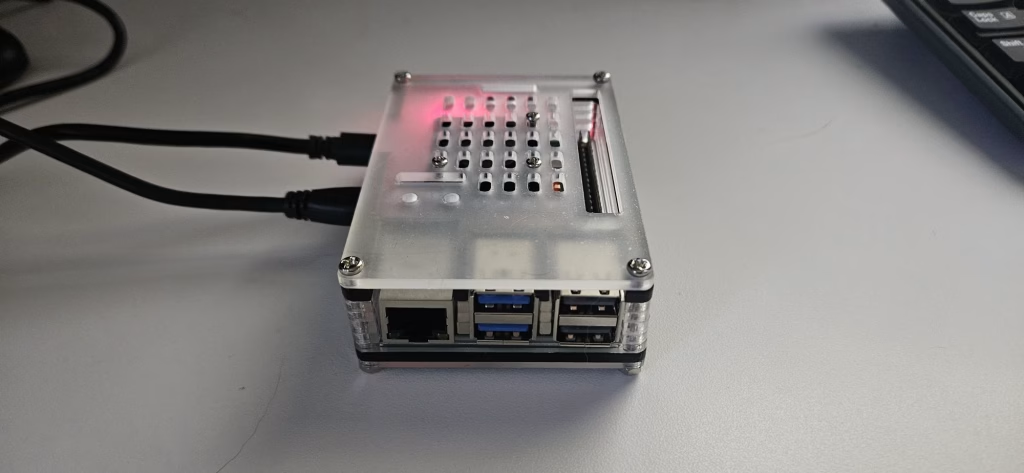
Raspberry Pi shines when you want to:
- Monitor multiple sensors simultaneously (pH, EC, temperature, humidity, water level)
- Log data over weeks or months to analyze growth trends
- Access your system remotely via smartphone or web browser from anywhere
- Integrate with smart home platforms (Home Assistant, Node-RED)
- Run open-source software like Mycodo for advanced nutrient dosing based on plant growth stage
- Control nutrient injection, aeration, and lighting all from one unified dashboard
The Raspberry Pi 5 (2GB model) starts at $50, making it cost-competitive with Arduino when you factor in shields and WiFi modules. Unlike Arduino, it runs a full Linux operating system, so you can use pre-built automation software without writing code from scratch.
Which Hydroponic Systems Benefit Most from Smart Automation?
Best System Types for Arduino/Raspberry Pi Control
Deep Water Culture (DWC): Ideal for both Arduino and Raspberry Pi. Arduino can manage pump cycles and water-level alerts. Raspberry Pi excels at monitoring dissolved oxygen and nutrient uptake rates.
Nutrient Film Technique (NFT): Benefits from precise pump timing and flow-rate monitoring. Raspberry Pi’s data logging helps optimize film thickness and flow duration.
Ebb and Flow: Perfect for Arduino to control filling and draining cycles. Raspberry Pi can adjust cycle timing based on plant growth stage or weather conditions.
Aeroponics: Benefits from precise misting interval control. Raspberry Pi can monitor mist pressure and nozzle blockages in real-time.
Wick Systems: Low-automation needs; Arduino is sufficient and cost-effective.
Choosing the right hydroponic system type for beginners → Beginner Hydroponics
Budget Build Breakdown: What You’ll Actually Spend
Arduino-Based Simple Automation Setup (~$60–$100)
| Component | Cost | Notes |
|---|---|---|
| Arduino Uno or Nano | $22–$30 | Uno is larger; Nano is compact |
| Water pump (submersible, 3–6V DC) | $8–$15 | 1000–3000 GPH sufficient for small systems |
| Relay module (1–2 channel) | $3–$8 | Controls pump and optional light |
| DHT11 temperature/humidity sensor | $2–$5 | Basic; DHT22 is $5–$10 for better accuracy |
| USB cable and power supply | $5–$10 | Reuse old wall adapter if available |
| Tubing, connectors, breadboard | $10–$20 | Hardware store basics |
| Total | $60–$100 | Can operate on 5V USB power |
Raspberry Pi-Based Advanced Setup (~$120–$200)
| Component | Cost | Notes |
|---|---|---|
| Raspberry Pi 5 (2GB or 4GB) | $50–$65 | 4GB recommended for Mycodo |
| SD card (64GB) | $15–$25 | For OS and data storage |
| Power supply and cooling | $15–$30 | Pi 5 benefits from active cooling |
| DHT22 sensor | $5–$10 | Better than DHT11; narrower error margin |
| DS18B20 waterproof temp sensor | $3–$8 | Submersible for reservoir monitoring |
| pH sensor (DFRobot analog) | $40–$60 | Premium; budget alternatives $10–$20 |
| EC/TDS sensor | $20–$40 | Monitors nutrient concentration |
| Relay modules (2–4 channel) | $8–$20 | Controls multiple devices |
| Enclosure and wiring | $15–$25 | Protect electronics from humidity |
| Total | $180–$280 | Can run 24/7; suitable for long-term monitoring |
[INTERNAL LINK: calculating ROI on smart hydroponic automation → suggested target topic]
Arduino Step-by-Step Setup: A Beginner’s Build
Required Tools and Materials
Electronics:
- Arduino Uno R3
- 5V relay module (1 or 2 channel)
- DHT11 or DHT22 sensor
- USB micro cable and 5V power adapter
- Jumper wires (pack of 40+)
- Breadboard (optional but helpful)
Hydroponic Components:
- Small submersible pump (3–6V, 500–1000 GPH)
- 6mm plastic tubing
- Net pots and growing medium (clay pebbles, rockwool)
- Small plastic container for reservoir
- Air pump and air stone (for oxygenation)
Step 1: Set Up Your Development Environment
Download the Arduino IDE (Integrated Development Environment) from arduino.cc for free. This is the software where you’ll write and upload code to your board. It’s available for Windows, macOS, and Linux.
Connect your Arduino to your computer via USB. When you first plug it in, your operating system will install drivers automatically (or you may need to install CH340 drivers if using a clone board).
Step 2: Connect Your Sensors to the Arduino
The DHT11 sensor has three pins: VCC (power), GND (ground), and DATA (signal). Connect VCC to Arduino 5V, GND to Arduino GND, and DATA to Arduino pin 2. The sensor reads temperature and humidity every 2 seconds.
For the relay module, connect its VCC and GND to Arduino power rails, and the Signal pin to Arduino pin 13. This allows the Arduino to control whether the pump turns on or off.
The pump itself connects to the relay’s normally-open (NO) terminal. When the relay receives a HIGH signal from the Arduino, it closes the circuit and power flows to the pump.
Step 3: Install Required Libraries
In the Arduino IDE, go to Sketch > Include Library > Manage Libraries. Search for “DHT” and install the library by Adafruit. This gives you pre-written code to read your sensor without building it from scratch.
Step 4: Upload Your First Automation Code
Below is a simple sketch that turns the pump on for 30 seconds every 2 hours, while monitoring temperature and humidity:
cpp#include "DHT.h"

#define DHTPIN 2
#define DHTTYPE DHT11
DHT dht(DHTPIN, DHTTYPE);

const int relayPin = 13;
const unsigned long pumpInterval = 2 * 60 * 60 * 1000; // 2 hours in milliseconds
const unsigned long pumpDuration = 30 * 1000; // 30 seconds

unsigned long lastPumpTime = 0;
boolean pumpRunning = false;
unsigned long pumpStartTime = 0;

void setup() {
  Serial.begin(9600);
  dht.begin();
  pinMode(relayPin, OUTPUT);
  digitalWrite(relayPin, LOW); // Pump off initially
}

void loop() {
  unsigned long currentTime = millis();

  // Read sensor every 2 seconds
  float humidity = dht.readHumidity();
  float temperature = dht.readTemperature();

  if (Serial.available() == 0) {
    Serial.print("Temp: ");
    Serial.print(temperature);
    Serial.print("°C, Humidity: ");
    Serial.println(humidity);
  }

  // Check if it's time to start pump
  if (currentTime - lastPumpTime >= pumpInterval && !pumpRunning) {
    digitalWrite(relayPin, HIGH); // Turn pump ON
    pumpRunning = true;
    pumpStartTime = currentTime;
    Serial.println("Pump ON");
  }

  // Check if pump should stop
  if (pumpRunning && (currentTime - pumpStartTime >= pumpDuration)) {
    digitalWrite(relayPin, LOW); // Turn pump OFF
    pumpRunning = false;
    lastPumpTime = currentTime;
    Serial.println("Pump OFF");
  }

  delay(2000); // Check every 2 seconds
}
Upload this code to your Arduino via USB. Open the Serial Monitor (Tools > Serial Monitor) to see real-time temperature, humidity, and pump status.
Step 5: Test and Refine
Watch your system for at least one full pump cycle (2.5 hours). Verify that:
- Temperature and humidity readings update every 2 seconds
- The pump activates at the correct interval
- The pump runs for exactly 30 seconds before stopping
- No error messages appear in the Serial Monitor
Adjust pumpInterval and pumpDuration based on your specific hydroponic system’s needs. DWC systems typically need circulation every 2–4 hours; NFT systems may need continuous or more frequent flow.
Step 6: Add Optional Features
Once the basic setup works, consider expanding:
- Water-level sensor: Add a float switch to alert you if the reservoir runs low
- Light control: Connect a second relay to control LED grow lights on a 16-hour on / 8-hour off cycle
- WiFi connectivity: Upgrade to an Arduino WiFi Rev2 (~$45) to send notifications to your phone
- pH monitoring: Add an analog pH probe and sensor circuit (~$20–$50) to adjust nutrient levels
Raspberry Pi Build: Leveraging Mycodo for Advanced Control
Why Mycodo?
Mycodo is open-source automation software purpose-built for hydroponic and environmental monitoring. It runs on Raspberry Pi and provides:
- A web dashboard you access from any browser (local or remote via VPN)
- Automatic data logging to CSV or database
- Conditional logic (if pH > 7, add pH-down solution; if humidity > 80%, turn on fan)
- Multi-sensor support out of the box
- Email and SMS alerts for system failures
Installing Mycodo on Raspberry Pi
Start with a fresh Raspberry Pi OS installation on a 64GB SD card. Connect via SSH (or local terminal) and run:
bashcurl -L https://install.mycodo.net | bash
This script installs all dependencies and Mycodo’s web interface. After installation, open your browser to http://<your-pi-ip>:8080 to access the dashboard.
Connecting Sensors to Raspberry Pi
Raspberry Pi uses GPIO (General Purpose Input/Output) pins to read sensors. The DHT22 sensor connects to GPIO pin 17, DS18B20 to GPIO pin 4, and analog sensors (pH, EC) connect via an I2C ADC (Analog-to-Digital Converter) board.
Within Mycodo, you add each sensor via the web interface without writing code. The software handles data collection and display automatically.
Setting Up Conditional Automation
In Mycodo, create a “Conditional” that says: “If pH drops below 6.2, turn on the acid pump for 5 seconds.” You define the sensor, threshold, and action entirely through the UI. Multiple conditions run simultaneously, giving you sophisticated control.
[INTERNAL LINK: advanced nutrient dosing strategies for hydroponic systems → suggested target topic]
Key Sensors Every Smart System Needs
Temperature and Humidity (DHT22)
Optimal range for most leafy greens: 18–24°C (65–75°F) day, 15–18°C (60–65°F) night. Humidity should stay 50–70% to prevent mold and pest issues.
Cost: $5–$10. The DHT22 is more accurate (±0.5°C) than DHT11 (±2°C) and well worth the extra few dollars.
Water Temperature (DS18B20)
Roots prefer 18–22°C for nutrient absorption. Temperatures above 24°C increase disease risk and reduce oxygen in the water.
Cost: $3–$8 for a waterproof probe. Easily read by both Arduino and Raspberry Pi via one-wire protocol.
pH (Analog pH Probe + Sensor Module)
Most plants thrive at pH 5.5–6.5 in hydroponic solutions. pH outside this range causes nutrient lockout, where plants can’t absorb minerals even if present.
Cost: $40–$60 for a quality sensor like DFRobot’s pH-4502C, or $10–$20 for budget alternatives. Requires regular calibration with pH 4.0 and pH 7.0 buffer solutions ($10–$20).
Electrical Conductivity / Total Dissolved Solids (EC/TDS)
Measures nutrient concentration in your water. Most hydroponic nutrients run best at 1.2–1.8 EC (or 800–1200 PPM).
Cost: $20–$40 for a DFRobot EC sensor. Budget clones exist but often drift and need frequent recalibration.
Water Level
Prevents pump cavitation and alerts you to leaks. A simple float switch costs $5–$10; ultrasonic distance sensors ($10–$20) offer non-contact monitoring.
Step-by-Step System Setup and Configuration
1. Assemble Your Hydroponic Base
Choose a hydroponic system type. For beginners, DWC is simplest: two 5-gallon buckets (one for plants, one as a reservoir), connected by airline tubing. Fill the grow bucket with nutrient solution and net pots of your chosen growing medium.
2. Mount Your Pump and Aeration
Position the submersible pump in the lower reservoir. If using DWC, add an air pump with an air stone to oxygenate roots. Air pumps run continuously; water pumps cycle every 2–4 hours for most systems.
3. Wire Sensors Into Your Microcontroller
Carefully route sensor cables away from water to prevent shorts. Use shielded cable for pH and EC sensors to reduce electromagnetic noise. Label every connection.
4. Calibrate Your Sensors
Before running your system, calibrate each sensor:
- pH probe: Dip in pH 7.0 buffer, note the analog reading. Dip in pH 4.0 buffer, note that reading. Use these two points to calculate slope in your code.
- EC sensor: Immerse in a known-concentration calibration solution (usually included), record the analog value.
- Temperature: Compare readings against a trusted thermometer; sensors are usually accurate within ±1°C out of the box.
5. Fill Your Reservoir and Run a Dry Test
Fill your system with plain water (no nutrients yet). Run your pump and light cycles for 24–48 hours to check for leaks, electrical issues, and sensor stability. Fix any problems before adding nutrients.
6. Add Nutrients and Monitor
Mix your hydroponic nutrient solution according to package directions. Test pH and EC. Adjust to your target range using pH up/down and dilution. Let the system run for 3–5 days, logging sensor readings, before planting.
7. Plant and Observe
Start with fast-growing crops like lettuce, basil, or spinach (ready in 3–5 weeks). Watch for wilting, yellowing, or pest issues. Photograph plants every few days to track growth. Keep detailed notes in a journal.
Maintenance Schedule for Long-Term Success
Daily Checks (5 minutes)
- Visually inspect plants for wilting or discoloration
- Check water level; top up if it drops more than 20% in a day
- Verify pump and air stone are running without noise changes
Weekly Tasks (15 minutes)
- Clean or replace any visible algae on tubing or grow bed edges
- Measure and log pH and EC in a notebook or spreadsheet
- Inspect relay and wiring for corrosion or loose connections
- Check that temperature and humidity are within range
Bi-Weekly Maintenance (30 minutes)
- Drain 20–30% of your nutrient solution and top up with fresh water and nutrients (reduces salt buildup)
- Clean air stone by soaking in weak hydrogen peroxide solution (1:10 ratio) for 10 minutes, then rinse
- Check pump intake for debris; clean mesh filter if present
Monthly Deep Clean (1 hour)
- Remove and rinse all visible surfaces in contact with water
- Check for calcium deposits on air stones or tubing; soak in white vinegar if present
- Calibrate pH and EC sensors against fresh buffer and calibration solutions
- Review your log to identify any trends (temperature creep, gradual EC rise, etc.)
End-of-Cycle Flush (varies)
When harvesting, drain your entire system and give it a thorough scrub with a weak bleach solution (1:100 ratio) to eliminate algae spores and pathogens. Rinse thoroughly at least 3 times before re-filling.
Common Problems and Real-World Solutions
Problem: Pump Won’t Turn On
Cause: Relay not receiving power from Arduino, or pump is clogged.
Solution: Use a multimeter to check continuity through the relay. Listen for a click when the relay should activate. If silent, your Arduino pin may be stuck LOW or the relay is dead. Swap the relay with a known-working one. If the pump makes noise but no water flows, clear the intake filter.
Problem: pH Keeps Rising
Cause: Bacterial breakdown of organic matter (algae or dead roots) adds alkalinity. High carbonate in your water source.
Solution: Increase water changes from weekly to every 4–5 days. Check your source water’s alkalinity; if high, use distilled or RO water for top-ups. Add pH-down more frequently in smaller amounts rather than large doses.
Problem: Plants Yellowing Despite Adequate Light
Cause: Nutrient deficiency (often nitrogen or iron), or pH lockout preventing absorption.
Solution: First, check pH. If 5.5–6.5, reduce nutrient EC by 20% (over-feeding causes tip burn and interveinal chlorosis). If pH is correct and EC is normal, add a broad-spectrum hydroponic micronutrient supplement. Wait 3–5 days before judging results.
Problem: Algae Blooms in Reservoir
Cause: Light reaching the nutrient solution; stagnant water; high nitrate levels.
Solution: Wrap all tubing and reservoir in black tape or cover to block light. Ensure air pump runs continuously for oxygenation. Reduce nutrient strength by 15% and increase water change frequency. Use hydrogen peroxide (1 ml per liter) as an algaecide, but don’t exceed 2 ml per liter or plants may struggle.
Problem: Root Rot and Mushy Stems
Cause: Water temperature above 24°C, insufficient dissolved oxygen, pathogenic bacteria or fungi.
Solution: Cool the reservoir (add an aquarium chiller, or reduce room temperature). Increase aeration with additional air stones. Consider a hydrogen peroxide soak (3 ml per gallon for 30 minutes) to kill anaerobic bacteria. Replace growing medium. For Arduino-based systems, add a temperature sensor and alert if water exceeds 23°C.
Problem: High Power Consumption
Cause: Relay drawing continuous current, or pump running more than designed.
Solution: Ensure your relay is energized only when needed; don’t leave pump on 24/7 unless required. For Arduino systems, add a transistor or MOSFET to switch high-current devices rather than routing all power through the relay. For Raspberry Pi, enable lower power states when the Pi isn’t processing data.
Best Plant Types for Smart Hydroponic Systems
Fastest-Growing (3–5 weeks):
- Lettuce (butterhead, iceberg, loose-leaf)
- Arugula
- Spinach
- Basil
- Watercress
Moderate Growth (6–8 weeks):
- Kale
- Swiss chard
- Mint
- Cilantro
- Parsley
Longer Cycle (10–16 weeks):
- Tomatoes
- Peppers
- Strawberries
- Cucumbers
For absolute beginners, start with lettuce or basil. Both tolerate slight sensor errors and pH fluctuations, forgiving you while you learn. Once you’ve harvested one crop successfully, scale up to longer-season crops.
Hydroponic nutrient guide → Nutrient Best Practices
FAQ: Questions Smart Hydroponic Builders Ask
How much electricity does a smart hydroponic system use?
A typical Arduino setup draws 0.5–1 watt continuously (mostly the air pump and sensors). A Raspberry Pi setup draws 3–5 watts. Monthly cost is usually $0.50–$2, depending on local electricity rates. Grow lights are the biggest power consumer; LED panels run 20–50 watts.
Can I build this without any coding experience?
Yes, for Raspberry Pi and Mycodo (no coding required). For Arduino, you can copy and modify existing sketches from Instructables or GitHub without deep understanding. However, learning basic Arduino programming (loops, conditionals) takes a weekend and opens many doors.
What if my system fails while I’m away?
Sensor failures rarely cause immediate plant death. A non-functional pump means plants stop getting nutrients for a few days; most greens can tolerate that. To add redundancy, use a Wi-Fi relay that texts you when a failure occurs, or run a backup air pump on a separate timer. For Raspberry Pi, set up email alerts in Mycodo for any sensor anomaly.
How do I prevent mold in my grow area?
Maintain humidity at 50–70% using a dehumidifier if needed. Ensure good air circulation with a small fan (controlled by your system based on humidity). Clean the grow space weekly. Don’t splash water on leaves; keep foliage dry.
Can I connect my Arduino or Raspberry Pi to my phone?
Yes. Arduino WiFi Rev2 can send IFTTT notifications. Raspberry Pi can run a web server (Mycodo includes this) accessible via a secure tunnel or home automation platform. For true smartphone monitoring on the cheap, use a $2 motion-activated USB camera with cloud backup.
What’s the shortest time to harvest after planting?
Lettuce under 18 hours of light daily: 21–28 days. Basil: 28–35 days. Anything requiring pollination (tomatoes, peppers): 60–90 days. Your microcontroller should log planting date; use this to predict harvest windows.
How often do I need to replace sensors?
pH probes last 6–12 months before accuracy drifts. EC sensors last 1–2 years. Temperature sensors last indefinitely. DHT sensors sometimes fail after 2–3 years. Keep spares on hand; a $5–$10 backup sensor is cheaper than a failed crop.
Is it worth automating if I only have 4–6 plants?
Yes, because your time is valuable. A 30-minute automation build saves you 10 minutes daily. Over a year, that’s 60 hours saved. If your hourly rate is $20+, the ROI is immediate.
What growing medium works best with automated systems?
Expanded clay pebbles (best reusable option), rockwool cubes (biodegradable), coco coir (sustainable), or hydroton. Avoid soil; it clogs pumps and sensors. Clay pebbles cost approximately $20 per 25 liters and last 3–5 years with proper rinsing.
Can I use tap water, or do I need RO water?
Tap water works fine if your EC and pH readings are stable from day to day. If tap water pH fluctuates wildly or EC is very high (above 1000 PPM), switch to distilled or reverse-osmosis water for top-ups. RO systems cost $100–$300 but pay for themselves in 6–12 months on a large system.
Cost-Saving Tips and Tricks
Buy clone boards: Arduino clones (look for CH340 chip) cost $8–$15 instead of $22+. They work identically; the only downside is weaker customer support.
Use eBay or AliExpress: Sensors from China cost 1/3 the price of U.S. retailers but ship in 2–4 weeks. Order early and stock spares.
Repurpose containers: 5-gallon food buckets (often free from bakeries or restaurants) work as reservoirs. Use PVC pipe from hardware stores instead of expensive hydroponic-branded tubing.
Share infrastructure: If growing with a friend, split the cost of a Raspberry Pi system and two independent sensor sets. Both of you log data to the same device.
Start small: One small hydroponic bed ($50–$100) and one microcontroller ($30–$70) is plenty to learn. Scale up after your first successful harvest.
What to Avoid: Common Beginner Mistakes
Buying expensive all-in-one systems: AeroGarden and Click & Grow cost $200–$900 and lock you into proprietary nutrients. A DIY build teaches you more and costs 1/4 the price.
Overcomplicating the first build: Don’t add pH sensors, EC sensors, and WiFi to your first system. Get basic pump automation working first, then expand.
Ignoring calibration: A miscalibrated pH sensor sends false alerts and wastes nutrients. Calibrate weekly for the first month, then bi-weekly.
Running pumps 24/7: This causes root rot and wastes electricity. Most systems need circulation 3–4 times per day, 20–30 minutes per cycle.
Skipping the journal: You won’t remember why your plants died 2 months ago. Write everything: dates, temperatures, nutrients added, visual observations. This data is worth more than the sensors.
Mixing soil and hydroponics: Soil particles clog pumps and sensors. Once you go hydroponic, keep the system clean.
Scaling Up: From 1 Arduino to a Multi-Zone System
After your first successful harvest, consider expanding to multiple growing beds or crop types. Here’s the progression:
Phase 1 (Month 1–3): One Arduino, one growing bed, basic sensors. Cost: $60–$100.
Phase 2 (Month 3–6): Add a second bed with its own pump on the same Arduino (add a second relay, cost: $3–$5). Same sensors serve both beds.
Phase 3 (Month 6–12): Switch to Raspberry Pi with Mycodo. Add dedicated sensors per bed. Integrate WiFi and smartphone alerts. Cost: $150–$250 total.
Phase 4 (Year 1+): Run 3–5 beds with different crops, each with specialized lighting and nutrient profiles. Upgrade to a larger Raspberry Pi or even a small PC. Cost: $300–$600.
This scaling approach lets you learn incrementally without overwhelming investment.
Author’s Note
I’ve built and maintained multiple hydroponic systems in Phoenix, Arizona, where the dry heat creates both challenges and opportunities for year-round indoor growing. Automated controls have been essential in my home setups, especially during hot months when water temperature climbs above 24°C without active cooling or frequent water changes. In my experience, Arduino-based systems excel for straightforward tasks like timing the main circulation pump and controlling light cycles, while Raspberry Pi with Mycodo justified itself once I added pH monitoring and nutrient injection. The most reliable systems I’ve built combine simple, proven hardware with minimal code complexity: the fewer moving parts and conditional rules, the fewer things break. I’ve learned more from failed harvests and sensor errors than successes, and I encourage every new hydroponic grower to keep detailed notes and view their first system as a learning prototype, not a final product. Phoenix’s harsh, dry climate makes humidity management critical; automated dehumidifiers and fans controlled by the Raspberry Pi have been game-changers. Whether you start with Arduino or Raspberry Pi, begin with one crop, one growing bed, and one primary sensor, then expand as confidence and knowledge grow.
Share this:

Discover more from Soil Free Harvest
Subscribe to get the latest posts sent to your email.








2 Comments