How to Build a Headless Hydroponic Monitor: No-Screen pH/EC Logger You Read From Your Phone
A headless hydroponic monitor is a small “black box” that sits near your reservoir, reads pH, EC, and temperature, then sends the data to your phone or laptop over Wi Fi without any local screen. It is ideal for renters, small apartments, hot Arizona garages, and cold Michigan basements because you only need a power outlet, Wi Fi, and a place to mount the box.
TL;DR: You can build a no screen hydroponic pH/EC logger with an ESP32 or Wi Fi enabled Arduino, pH and EC probes, and a simple cloud or self hosted dashboard for roughly 120 to 220 USD, depending on sensor quality. It will log your readings every few minutes, visualize trends, and send alerts when pH or EC drift out of range so you can adjust your nutrient solution without standing over the reservoir in extreme heat or cold.
Affiliate Disclosure: This article contains affiliate links. If you purchase through these links, soilfreeharvest.com may earn a small commission at no extra cost to you.
What is a “headless” hydroponic monitor?
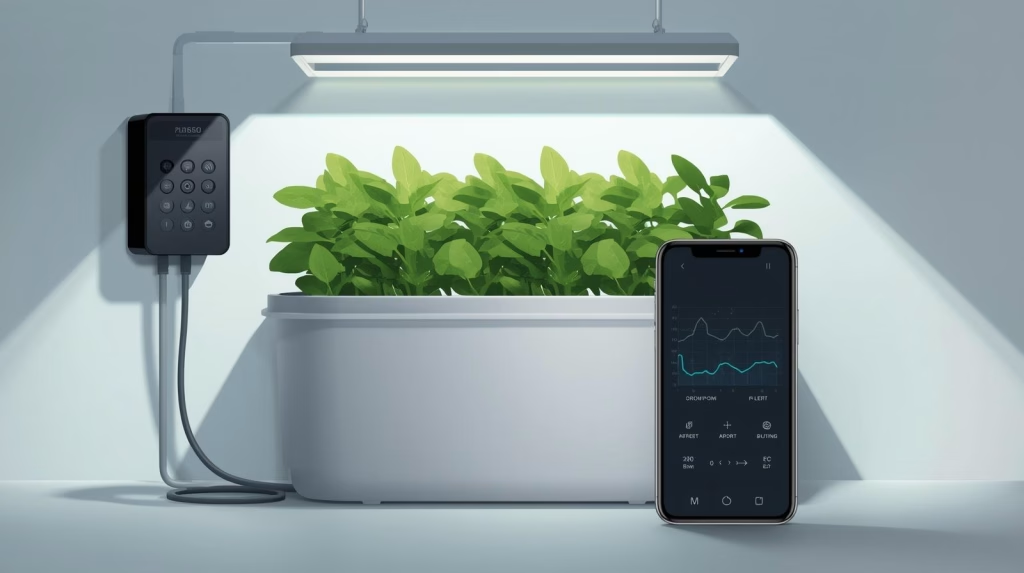
A headless hydroponic monitor is a monitoring box without a built in screen that continuously measures your nutrient solution and environment and publishes those readings over Wi Fi to a phone friendly dashboard. Think of it like a flight data recorder for your hydroponic reservoir that quietly logs pH, EC, and temperature in the background.
Instead of walking over and pressing buttons on a controller, you open an app, web page, or smart home panel to see live and historical data. Because it has no display or physical controls, it is cheaper, smaller, and easier to tuck under a rack, inside a grow tent, or on a garage shelf.
What is hydroponics → intro to hydroponic growing
How does a Wi Fi hydroponic “black box” work?
At a high level, the system uses three layers: sensors, a Wi Fi microcontroller, and a data dashboard or logging service.
- pH and EC probes sit in or near your reservoir and connect to small signal conditioning boards that translate the analog readings into digital data.
- An ESP32, Arduino MKR WiFi, or similar board reads those sensors every 30 to 300 seconds, does basic averaging and temperature compensation, and connects to your Wi Fi network.
- The board sends readings to a server or cloud service using MQTT, HTTP, or a mobile app platform so you can graph values, set thresholds, and trigger alerts.
From the user side, you see a timestamped log with pH, EC, and reservoir temperature, and you can scroll through days or weeks of data to understand how your system behaves between top ups and nutrient changes.
Hydroponic system monitoring basics → beginner hydroponic monitoring guide
What are realistic pH and EC targets for this build?
Most home hydroponic systems do well with pH between 5.5 and 6.5, with an average around 6.0 to 6.2 for mixed crops. EC targets vary by crop and growth stage, but many home systems stay between 1.2 and 2.0 mS/cm for leafy greens and herbs and up to about 2.5 mS/cm for fruiting crops like tomatoes.
Some typical ranges:
| Crop type | Typical pH range | Typical EC range (mS/cm) |
|---|---|---|
| Lettuce, spinach | 6.0 to 7.0 | 1.2 to 2.5 |
| Herbs (basil, mint) | 5.5 to 6.5 | 1.0 to 1.6 |
| Tomatoes, strawberries | 5.5 to 6.5 | 1.0 to 2.5 |
This headless monitor works well for deep water culture, Kratky totes, NFT channels, and small media buckets where reservoir volume is under about 50 gallons because trends over hours and days matter more than second by second control.
Hydroponic nutrient solution pH chart → pH range guide for hydroponic crops
Why build a headless monitor instead of buying a controller?
Prebuilt hydroponic controllers with screens are convenient, but they cost more, take more space, and often assume a fixed installation that is not renter friendly. A DIY black box monitor lets you place a small, sealed project enclosure wherever you have an outlet and Wi Fi, then read everything from your phone.
Key advantages for renters and small spaces:
- Lower upfront cost: using an ESP32 board and open source software, you can get basic pH/EC logging and alerts for roughly 120 to 220 USD depending on probe quality.
- Flexible mounting: the box can be zip tied to a rack, taped to a wall, or set on a shelf without drilling large holes or mounting big displays.
- Heat and cold friendly: you do not have to stand over a hot Arizona garage reservoir or open a Michigan basement tent in winter just to check pH.
The main tradeoff is that you rely on your phone or a browser, and you will need some basic comfort with plugging in wires and loading example code.
What parts do you need for a budget no screen pH/EC logger?
There are many ways to assemble this, but a reliable, budget friendly stack for most home growers uses an ESP32, mid range probes, and either a simple cloud dashboard or a small server like Mycodo or Home Assistant.
Basic bill of materials with approximate price ranges:
| Component | Example / notes | Approx cost (USD) |
|---|---|---|
| ESP32 board or Arduino MKR WiFi | Wi Fi microcontroller, 3.3 V logic | 10 to 30 |
| pH probe + interface board | uFire or similar pH module with BNC probe | 40 to 80 |
| EC probe + interface board | uFire or similar EC module with BNC probe | 40 to 80 |
| Waterproof temperature sensor | DS18B20 or similar digital probe | 5 to 15 |
| Project box and cable glands | Plastic IP rated enclosure | 10 to 25 |
| 5 V power supply | Wall adapter or USB power brick | 10 to 20 |
| Jumper wires, headers, small hardware | Dupont wires, screws, zip ties | 5 to 15 |
With modest probes and a free or low cost dashboard, the total typically lands between about 120 and 220 USD.
Which microcontroller and dashboard should you pick?
For a headless, Wi Fi connected monitor, two common combinations work well for beginners and intermediate growers.
- ESP32 + mobile app platform:
- ESP32 boards are inexpensive, have built in Wi Fi, and can talk to pH/EC modules over I2C or UART.
- App platforms let you build phone dashboards and notifications through a visual editor, which is friendly if you do not want to host your own server.
- Arduino MKR WiFi 1010 + MQTT + Mycodo/Home Assistant:
- An Arduino MKR WiFi can publish pH and EC readings to MQTT topics which a server like Mycodo can log and graph.
- This path is a bit more technical, but it is very flexible, especially if you already use Home Assistant or a Raspberry Pi for other smart home tasks.
In my own hydroponic garages, I find ESP32 plus a phone app easiest for first time builders, while Arduino or ESP32 plus MQTT is better if you plan to integrate environmental sensors, cameras, and automation later.
Raspberry Pi vs Arduino for hydroponics → controller board comparison for growers
How do you physically set up the “black box” for Arizona garages and Michigan basements?
Physical layout matters because you want accurate readings without tripping over cables.
For hot Phoenix area garages:
- Keep the electronics box out of direct sun and off hot concrete, preferably on a shelf or hung on a wall, to avoid thermal stress on the microcontroller and sensors.
- Route the pH/EC probes into the reservoir through a lid or grommet so only the probe tips are submerged and cable strain is minimized.
- Consider a Wi Fi capable fan or vent in the garage so your phone connection remains stable around metal racks and stored items.
For cold Michigan winters and basements:
- Place the project box somewhere with relatively stable temperatures even if the grow tent is cooler or warmer than the room.
- Make sure the temperature probe is in the reservoir so you can see if water is drifting too cold for tomatoes or warm season greens.
- If you plan to expand to automation later, leave space for future relays or pump drivers in the enclosure.
For renters, aim for a setup that uses zip ties, command strips, or simple shelving so everything can be removed without holes or permanent wiring.
How to build a headless hydroponic monitor (step by step)
Title: Build a headless Wi Fi hydroponic pH/EC monitor
Description: This procedure walks you through assembling a no screen hydroponic monitor that logs pH, EC, and temperature and sends data to your phone over Wi Fi.
Materials and tools
Materials:
- 1 ESP32 or Arduino MKR WiFi board
- 1 pH probe with compatible interface board (uFire or similar)
- 1 EC probe with compatible interface board (uFire or similar)
- 1 waterproof temperature sensor such as DS18B20
- 1 plastic project enclosure with lid
- 2 to 3 cable glands or grommets for probe cables
- 1 5 V power adapter and USB cable
- Jumper wires and header pins
Tools:
- Small screwdriver
- Soldering iron (optional but recommended for secure connections)
- Drill or step bit for cable gland holes
Step 1: Plan your layout
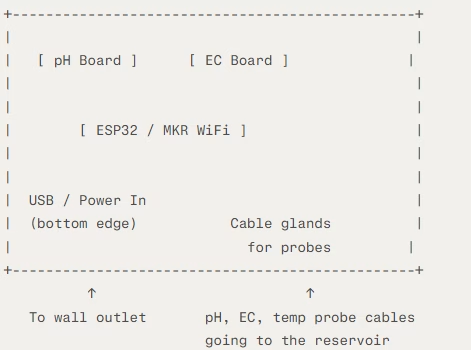
Decide where the box will sit, where probes will enter the reservoir, and how long the cables must be. Sketch the enclosure interior so microcontroller, pH board, EC board, and wiring have clear paths and strain relief.
Example enclosure layout sketch
When I plan a headless monitor box, I like to start with a quick top down sketch like this:
Key ideas to copy in your own sketch:
- Keep the microcontroller in the center so wires from each sensor board can reach it without crossing over each other.
- Put the pH and EC boards on the opposite side from the power entry to keep their signal lines away from electrical noise.
- Group all probe cable glands on one side of the box so the pH, EC, and temperature cables drop cleanly toward the reservoir with a gentle loop for strain relief.
Step 2: Prepare the enclosure
Mark and drill holes in the project box for the probe cable glands and a USB or power entry point. Dry fit the glands and pass through the cables to make sure everything reaches your reservoir comfortably.
Step 3: Wire the pH and EC modules
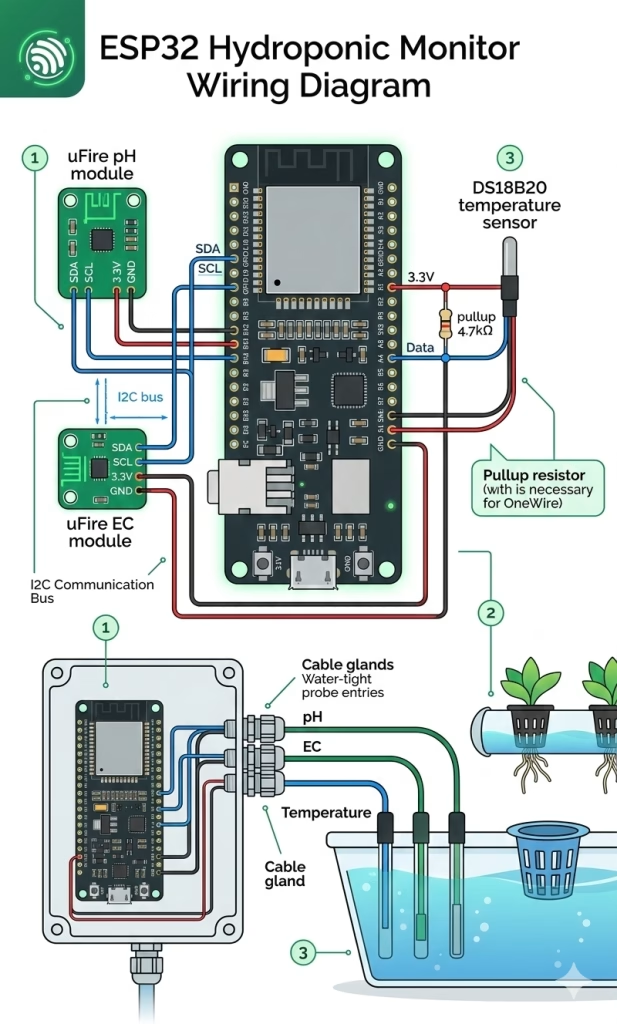
Connect the pH and EC interface boards to your microcontroller using I2C or the appropriate interface, usually SDA, SCL, power, and ground. For uFire style modules, you can daisy chain their connectors and then bring one cable to the controller, keeping wiring simple.
Step 4: Add the temperature sensor
Wire the DS18B20 or similar temperature sensor to a digital pin with power and ground, following the board’s recommended resistor and wiring diagram. Place the sensor cable through a cable gland so the probe end can be submerged or clipped to the reservoir wall.
Step 5: Load example Wi Fi and sensor code
Install the Arduino IDE or PlatformIO, add the necessary libraries for your pH, EC, and temperature modules, and load an example sketch for Wi Fi connectivity. In many open examples, the code reads sensors, publishes them to MQTT topics or a cloud API, and automatically reconnects to Wi Fi and the server if the connection is lost.
Quick setup path: Use the Arduino IDE (free download from arduino.cc) for the simplest path. If you are comfortable with VS Code, PlatformIO is faster for managing libraries and multiple boards.
More detailed steps below – Code changes so there will potentially need to be troubleshooting on the code provided below – it is an example of what the code might look.
Install Arduino IDE and ESP32 support
- Download and install Arduino IDE 2.x (or 1.8.x if you prefer).
- Open File > Preferences, and add this URL to Additional Boards Manager URLs:
https://espressif.github.io/arduino-esp32/package_esp32_index.json - Go to Tools > Board > Boards Manager, search “ESP32”, and install the “esp32” package by Espressif Systems.
- Select your board under Tools > Board > ESP32 Arduino > ESP32 Dev Module (or “Arduino MKR WiFi 1010” if using that).
- Pick the correct COM port under Tools > Port.
Install required libraries
Most uFire pH/EC modules (or similar I2C sensors) use these libraries. Install via Sketch > Include Library > Manage Libraries:
| Library name | Author | Why you need it |
|---|---|---|
uFire_pH | uFire | Reads and calibrates pH probes |
uFire_EC | uFire | Reads and calibrates EC probes |
DallasTemperature | Miles Burton | Handles DS18B20 temp sensor |
PubSubClient | Nick O’Leary | MQTT client for data publishing |
WiFi or ESP32 WiFi | Built-in to ESP32 core | Wi Fi connectivity |
ArduinoJson | Benoit Blanchon | Formats data for HTTP/MQTT |
Search by name, install the latest stable version.hackster+1
Wiring quick reference
Before coding, double check these common pins for uFire style modules on ESP32
textESP32 Pin → uFire pH/EC boards (I2C bus, daisy chained)
GPIO 19  → SDA (data line for both pH and EC)
GPIO 23  → SCL (clock line)
3.3V     → Power (most modules are 3.3V tolerant)
GND      → Ground

DS18B20 temp sensor:
GPIO 4   → Data pin + 4.7k pullup resistor
3.3V/GND → Power
Starter example
Copy this into a new Arduino sketch. It reads pH, EC, temp every 60 seconds, connects to Wi Fi, and publishes to MQTT (replace your credentials). This is adapted from common uFire + ESP32 examples.
cpp#include <WiFi.h>
#include <PubSubClient.h>  // MQTT
#include <Wire.h>          // I2C
#include "uFire_pH.h"      // Install from library manager
#include "uFire_EC.h"
#include "DallasTemperature.h"
#include <OneWire.h>

// WiFi credentials
const char* ssid = "YOUR_WIFI_SSID";
const char* password = "YOUR_WIFI_PASSWORD";

// MQTT broker (use a free public one or your Home Assistant/Mycodo)
const char* mqtt_server = "test.mosquitto.org";  // Or your broker IP
WiFiClient espClient;
PubSubClient client(espClient);

// Sensor setup
ISE_pH ph(19, 23);        // SDA=19, SCL=23
EC_Salinity ec(19, 23);   // Same I2C bus
#define ONE_WIRE_BUS 4
OneWire oneWire(ONE_WIRE_BUS);
DallasTemperature tempSensor(&oneWire);

unsigned long lastReading = 0;
const long interval = 60000;  // Read every 60 seconds

void setup() {
  Serial.begin(115200);
  Wire.begin();
  tempSensor.begin();

  // Connect WiFi
  WiFi.begin(ssid, password);
  while (WiFi.status() != WL_CONNECTED) {
    delay(500);
    Serial.print(".");
  }
  Serial.println("WiFi connected");

  // MQTT setup
  client.setServer(mqtt_server, 1883);
  reconnectMQTT();
}

void loop() {
  if (!client.connected()) {
    reconnectMQTT();
  }
  client.loop();

  unsigned long now = millis();
  if (now - lastReading > interval) {
    lastReading = now;

    // Read sensors (with temp compensation)
    float tempC = tempSensor.getTempCByIndex(0);
    float phValue = ph.read();  // Assumes calibrated
    float ecValue = ec.read(tempC);  // EC compensated for temp

    Serial.printf("pH: %.2f, EC: %.2f mS/cm, Temp: %.2f C\n", phValue, ecValue, tempC);

    // Publish to MQTT topics
    char msgBuffer[50];
    snprintf(msgBuffer, sizeof(msgBuffer), "%.2f", phValue);
    client.publish("hydroponics/ph", msgBuffer);

    snprintf(msgBuffer, sizeof(msgBuffer), "%.2f", ecValue);
    client.publish("hydroponics/ec", msgBuffer);

    snprintf(msgBuffer, sizeof(msgBuffer), "%.2f", tempC);
    client.publish("hydroponics/temp", msgBuffer);
  }
}

void reconnectMQTT() {
  while (!client.connected()) {
    Serial.print("Connecting MQTT...");
    if (client.connect("HydroMonitor")) {
      Serial.println("connected");
    } else {
      Serial.print("failed, rc=");
      Serial.print(client.state());
      delay(5000);
    }
  }
}
What this does:
- Connects to Wi Fi and MQTT broker automatically (with reconnect logic).
- Reads pH, EC (temp compensated), and temp every 60 seconds.
- Publishes clean values to topics like
hydroponics/phfor your dashboard (Blynk, Mycodo, Home Assistant) to subscribe to.hackster+2 - Calibrate first: Run uFire calibration examples separately before this main loop.instructables
Upload and test
- Click Verify (checkmark), then Upload (arrow). Watch Serial Monitor (Tools > Serial Monitor) at 115200 baud for debug output.
- Expected output: Wi Fi connects, MQTT connects, then sensor readings every minute.
- Common fixes: Wrong COM port? Check Device Manager. Wi Fi fails? Verify SSID/password. No sensor data? Check I2C wiring with an I2C scanner sketch.how2electronics+1
Next steps after upload
- Set up your dashboard: In Blynk, add Virtual Pins for pH/EC/temp. In Home Assistant, add MQTT sensors.
- Tweak interval (e.g., 300000 for 5 min) or add thresholds for alerts in the dashboard side.
In my own builds, starting with this MQTT pattern has worked reliably across multiple ESP32s and lets you expand to more sensors without rewriting everythin
Step 6: Configure your Wi Fi and logging
Edit the sketch with your Wi Fi SSID, password, and either the MQTT broker address, cloud dashboard credentials, or app token. Decide on a sampling interval, such as taking readings every 60 to 300 seconds, which is usually enough for pH and EC tracking.
Step 7: Calibrate pH and EC probes
Use standard pH 4.0 and 7.0 buffer solutions and at least one EC calibration solution in the 1.0 to 10.0 mS/cm range, then follow your sensor library’s calibration commands. Calibration routines usually ask you to place the probe in a known solution, call a calibration function, and store the resulting offsets and slopes in the module memory.
Step 8: Test readings in a bucket
Before installing on your live system, place the probes in a test bucket of nutrient solution or tap water, power the box, and confirm that pH, EC, and temperature values show up correctly on the dashboard. Make small changes such as adding a bit of nutrient or pH down and verify that readings move in the expected direction.
Step 9: Install on your system and tidy cables
Mount the hardware box on a nearby wall or shelf, route probes into the reservoir, and secure cables with zip ties to avoid strain. Label each probe and its cable so future troubleshooting is easy and use drip loops so any condensation or splashes do not run back into the enclosure.
Step 10: Set up alerts and thresholds
On your dashboard or app, create thresholds around your target pH and EC ranges and enable email, push, or SMS alerts when values drift out of range. For example, you might alert at pH 5.4 and 6.6 and EC outside 1.0 to 2.0 mS/cm for lettuce and herbs.
What maintenance and calibration does this system need?
Even the best digital monitor is only as accurate as its calibration and probe care.
- pH probes typically need calibration every 2 to 4 weeks for home use, especially in warm environments.
- EC probes are usually more stable but still benefit from periodic checks against a known solution.
- Probes should be kept clean, stored wet when recommended by the manufacturer, and checked for drift by comparing readings to a handheld meter or fresh solution occasionally.
In my own systems, a quick monthly routine of cleaning, calibration, and verifying one or two samples keeps automated readings within about 0.1 pH and 0.1 to 0.2 mS/cm of a handheld meter, which is more than accurate enough for leafy greens, herbs, and most home tomatoes.
Hydroponic maintenance checklist → weekly and monthly maintenance for home hydroponics
What are common problems and how do you troubleshoot them?
Most issues with headless monitors fall into three categories: sensor problems, Wi Fi problems, and dashboard configuration.
Common issues and quick checks:
- Flat or noisy readings: if pH and EC readings do not change when you add nutrients or pH adjusters, recheck probe wiring, ensure correct libraries are loaded, and verify that probes are not touching each other or metal surfaces that cause electrical noise.
- Wi Fi drops or missing logs: if data points disappear, check signal strength near the system, router distance, and whether the microcontroller code includes reconnection logic.
- Implausible values: extremely high or low EC or pH readings often mean a failed calibration, a dry or damaged pH probe, or contamination on the EC contacts, so clean and recalibrate before replacing parts.
Because everything is logged, you can see when a sensor went bad by looking for sudden jumps or flat lines, which is something I rely on in my own hydroponic logs when a garage sensor gets kicked or a probe dries out.
Hydroponic troubleshooting guide → diagnosing pH, EC, and nutrient issues
Which systems and plants benefit most from this monitor?
This headless monitoring approach works best for:
- Deep water culture tubs and Kratky totes where reservoir volume is moderate and you want to track long term trends in pH and EC.
- NFT channels and small media bed systems where nutrient strength swings as plants mature and you top up with water.
- Apartment friendly racks, grow tents, and garage setups where you do not want bulky control panels or visible wires.
Plant wise, leafy greens like lettuce, bok choy, and spinach, plus common herbs like basil and mint, respond quickly when you keep pH and EC inside their preferred ranges, often with noticeably steadier growth within 1 to 2 weeks of consistent control. Fruiting crops like tomatoes and peppers also benefit, but they are more tolerant of small swings as long as reservoir temperature stays reasonable.
Best hydroponic plants for beginners → easy crops for indoor hydroponics
DWC hydroponic setup → deep water culture guide
FAQ: Headless hydroponic monitor
How much does it cost to build a headless hydroponic monitor?
If you choose a budget ESP32 board and mid priced pH and EC probes, the total cost usually lands between about 120 and 220 USD. Higher end, lab grade probes will increase the price but also improve long term stability and accuracy.
Is this project too hard for beginners?
If you have plugged in an Arduino before and are comfortable following wiring diagrams, this build is manageable. The trickiest parts are calibrating pH and EC and getting Wi Fi credentials correct, both of which are well covered in existing example code and tutorials.
How often should I check my dashboard?
Once your system is dialed in, checking once or twice a day is usually enough for most home hydroponic setups. Because the monitor logs continuously, you can review trends every few days to see how top ups, nutrient additions, and environmental changes affect your reservoir.
What happens if the Wi Fi goes out?
Most DIY setups log data only when connected, so you may see gaps in your charts during outages. For critical systems, you can add a small SD card logger or local storage on the microcontroller so readings are saved and then uploaded once Wi Fi is restored.
Can I add more sensors later?
Yes, you can add sensors for water level, air temperature, humidity, and light intensity as long as your microcontroller has spare pins and power budget. Many ESP32 based hydroponic builds integrate multiple sensors and even control pumps and lights from the same board.
Will it control pumps or just monitor?
This article focuses on monitoring only so that the system stays simple and renter friendly. If you later want automation, you can add relays or solid state switches to control top up or dosing pumps, but you should make sure your logic and safety overrides are thoroughly tested first.
How quickly will I see benefits in plant growth?
You will not see an instant jump overnight, but within 1 to 2 weeks of keeping pH and EC in tighter ranges, many leafy greens and herbs show more consistent growth and less tip burn. Over a full crop cycle, better monitoring often translates into fewer nutrient issues and more predictable yields, especially in hot or cold conditions where reservoirs drift faster.
Is this safe to use in a rental apartment?
Used with a proper low voltage power supply, secure wiring, and a sealed enclosure, this kind of monitor is very safe and does not require any permanent modifications. Stick to UL listed adapters, keep all mains voltage equipment away from splashes, and use removable mounting like shelves or adhesive hooks.
Do I still need test drops or a handheld meter?
It is wise to have a backup handheld meter or test kit for occasional cross checks and for times when you suspect a probe issue. A quick comparison between your handheld and the logged values once or twice a month gives you confidence that the system is reading correctly.
Author note
I grow hydroponic greens, herbs, and tomatoes in hot Phoenix garages and now in a colder central Michigan climate, so my builds focus on reliability in both heat and winter chill. Most of my systems are compact, renter friendly racks and tents, which is why I rely on headless monitors that I can tuck under a shelf and read from my phone. Over multiple seasons, I have found that simple, well calibrated pH and EC logging prevents more problems than complicated automation, especially for busy home growers and apartment gardeners.
Quick Build: Headless Hydroponic pH/EC Monitor
Use this compact “black box” if you only care about logging pH, EC, and temperature and reading everything from your phone instead of a local screen. Mount the box near your reservoir, drop in the probes, connect to Wi Fi, and your dashboard or app will handle charts and alerts so you are not standing over a hot garage tote in Arizona or cracking open a chilly Michigan basement tent just to check numbers.
Core parts list
- 1 × ESP32 or Arduino MKR WiFi board
- 1 × pH probe + matching interface board (BNC style)
- 1 × EC probe + matching interface board (BNC style)
- 1 × Waterproof temperature sensor (DS18B20 or similar)
- 1 × Plastic project enclosure with lid
- 2–3 × Cable glands or rubber grommets for probe cables
- 1 × 5 V power adapter and USB cable
- Assorted jumper wires, header pins, zip ties, and labels
At a glance
Best use case: Renters, apartment growers, garages, and basements where you want remote visibility and alerts without installing a big controller panel
Approximate cost: 120–220 USD depending on probe quality
Ideal for: DWC totes, Kratky bins, NFT rails, small media buckets
Helpful Resources:
- IoT Hydroponics – Using Adafruit IO for EC, PH and Temperature Logging
- Arduino Hydroponics, DIY Hydroponics System using pH Sensor & EC Sensor, Hydroponic
Share this:

Discover more from Soil Free Harvest
Subscribe to get the latest posts sent to your email.